

Enterprise IT Visibility: Why Seeing Everything Is No Longer Enough.
If you’re currently on version 25.2 of BMC Discovery your searches, reports and Blueprints may not be telling the whole story. In this post, we want to share three practical themes that have come up in our work with the release:
- the RuntimeEnvironment search workaround associated with DRUD1-54212;
- the impact of ContainedSoftwareInstance on reporting and Blueprints; and
- what we can do when nodes appear to disappear from Blueprint models.
None of these issues necessarily prevents us from using BMC Discovery effectively. However, they can lead to incomplete results or confusing model behaviour if we are not aware of them. The good news is that there are straightforward workarounds.
1) RuntimeEnvironment: the numbers may be wrong (DRUD1-54212)
The first issue concerns the RuntimeEnvironment node and its in_container attribute.
If we run a generic query such as: search RuntimeEnvironment BMC Discovery will, by default, display only RuntimeEnvironment nodes where in_container is not set. The same behaviour affects the default dashboard reports that search directly from the RuntimeEnvironment node.
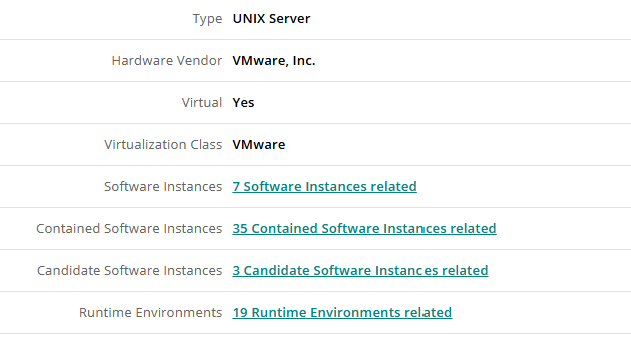
Figure 1: Host node with 19 Runtime Environments
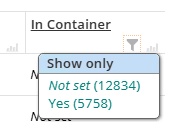
Figure 2: in_container Attribute
This can produce a misleading result. In one example, our generic search returned 12,834 RuntimeEnvironments. That initially looked like the total population. However, when we examined an individual Host record, we could see both containerised and non-containerised RuntimeEnvironments.
When we accounted for both types, the true figure was 18,592. That is a significant difference, and it is the kind of difference that can affect capacity reporting, software estate analysis and any operational decisions based on those numbers.
The workaround:
Until DRUD1-54212 is fixed, or we can upgrade the appliance to a version containing the fix, we should avoid starting this particular search directly from RuntimeEnvironment.
Instead, we start from the root Host node and traverse through the relationships to Runtime Environment:
search Host traverse Host:HostedSoftware:RunningSoftware:RuntimeEnvironment
This gives us the full set of RuntimeEnvironment nodes associated with Hosts, including those running inside containers.
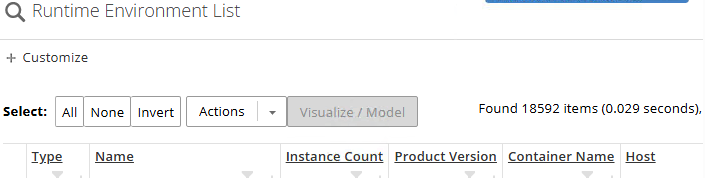
Figure 4: True figure of 18592 Runtime Environments
2) Containerised software is now easier to miss:
Containerised software is not new to BMC Discovery. It has been discoverable since version 11.2 through deep container discovery. What has changed in 25.2 is the introduction of a new node: ContainedSoftwareInstance.
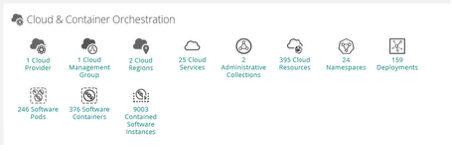
Figure 5: ContainedSoftwareInstance type
This gives us a more specific way to represent software instances running inside containers. However, it also means that existing searches, reports and Blueprints may not automatically include everything we expect.
For example, if we use:
search SoftwareInstance
We will not get software represented by ContainedSoftwareInstance. Any report or dashboard based solely on SoftwareInstance can therefore miss containerised software without making it obvious that anything is missing.
This is particularly important when we are comparing results from older BMC Discovery versions, building estate reports, or using a pre-existing Blueprint that was designed before the new node was introduced.
The Workaround: Include both node types
Where we want to report on all software instances, we need to use a multi-node search:
search SoftwareInstance, ContainedSoftwareInstance.
The same principle applies to Blueprints. If our Blueprint is intended to model all software instances, we need to start with a multi-node setup rather than assuming that SoftwareInstance is the only root node we need.
Otherwise, our model may be structurally correct but still incomplete from an estate-wide perspective.
2a) Lifecycle and support information
Containerised software still has lifecycle data available. The challenge is that the default dashboards point to SoftwareInstance, and there are no default reports specifically for ContainedSoftwareInstance.
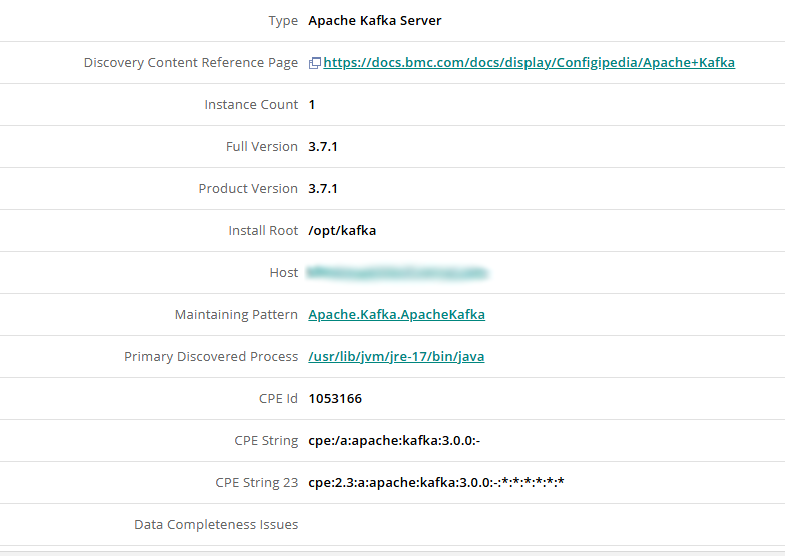
Figure 6: Contained Software Instance with missing Lifecycle data
As a result, the information exists in BMC Discovery but may not appear in the standard dashboard views. We also found that contained software instances do not display support information on their node page.
The Workaround:
There is a useful way around this for lifecycle reporting:
1. Open one of the out-of-the-box lifecycle reports.
2. Switch to the tabular view.
3. Copy the raw query.
4. Update the search term so that it includes both SoftwareInstance and ContainedSoftwareInstance.
5. Save the result as a custom report.

Figure 7: Visible lifecycle data for ContainedSoftwareInstance
This allows us to reuse the lifecycle logic already provided by BMC Discovery while expanding the search scope to include containerised software.
The main point is simple: from BMC Discovery 25.2, SoftwareInstance no longer means “all software instances”. We need to include ContainedSoftwareInstance explicitly wherever complete coverage matters.
3) Blueprint nodes can disappear:
Blueprints are still a relatively new capability. They were introduced in BMC Discovery 23.3, and they continue to evolve. As developers, we have found that models based on templates can sometimes behave unexpectedly: nodes may disappear after the model is saved, or after a scan has completed.
Because Blueprint inference happens in real time, we do not have access to the full internal decision-making process. We cannot simply open a rule log and see exactly why a node has been removed or replaced.
Through testing, however, we have been able to reproduce a disappearing-node scenario. It appears when we add multiple Blueprints to a model and there is either an observed relationship or a container relationship that overwrites the primary root-node container we are trying to establish.
The result is confusing. The model definition can look correct while we are building it, but after saving or scanning, one or more expected nodes may no longer be present in the BusinessApplicationInstance, whilst it still remains in the model definition.
Our workaround: combine TPL and Blueprints
The approach we have found most reliable is to use a hybrid solution that combines TPL with Blueprints.
If we are adding custom software, we will already be familiar with using TPL or Start Anywhere to generate a TPL pattern. That pattern can infer the nodes we need, which we can then model and enrich using a Blueprint.
For the disappearing-node scenario, we can extend that approach:
1. Use TPL, or Start Anywhere, to generate the required nodes and relationships.
2. Trigger the TPL pattern from the Blueprint-generated BusinessApplicationInstance node.
3. Use TPL to augment the model with the containerised relationships we need to retain.
4. Allow the Blueprint to handle the modelling and structure it is best suited to manage.
This gives us a clear division of responsibility. TPL establishes or reinforces the nodes and relationships, while the Blueprint provides the higher-level model. If the Blueprint inference process later overwrites part of the model, the important relationships have already been generated explicitly through TPL.
What to check after upgrading:
These three issues all point to the same underlying principle: the search root, the node type and the relationship model all matter.
When we upgrade to BMC Discovery 25.2, we should check that:
- our Runtime Environment reports use the Host traversal where necessary;
- our software reports and Blueprints include both SoftwareInstance and ContainedSoftwareInstance; and
- our more complex Blueprint models retain their nodes and relationships after saving and scanning.
With a few targeted changes, we can avoid under-reporting our software estate and reduce the risk of unexpected Blueprint behaviour.
For us, the key takeaway is that these are not reasons to avoid using BMC Discovery. They are reminders to validate what discovery is actually returning and to use the modelling tools together where the default behaviour is not enough.
About TekWurx
For more than two decades, TekWurx has helped some of the world's largest and most complex organisations design, implement, optimise and support BMC Discovery environments.
From large-scale Discovery deployments and appliance upgrades to performance optimisation, troubleshooting, data quality and CMDB integration, our consultants have worked with BMC Discovery since its earliest releases. We understand not only how the platform works, but how enterprise organisations depend on it to deliver trusted operational data.
Whether you need a second opinion, expert guidance or hands-on technical support, Contact TekWurx today to speak with one of our BMC Discovery specialists and discover how we can help you maximise the value of your BMC Discovery investment.